




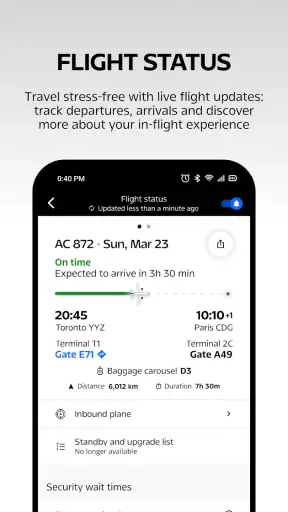

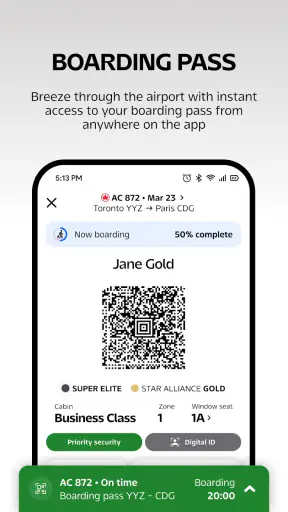
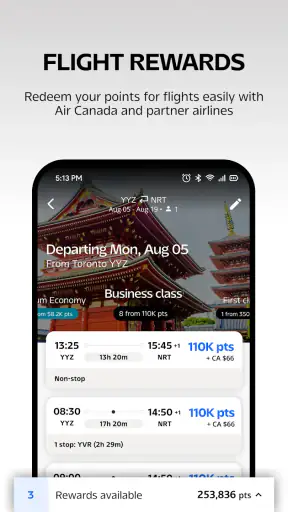


I found the Air Canada app most useful when I treated it as a travel companion for an Air Canada journey rather than as a complete replacement for every travel tool. It brings booking, flight management, and Aeroplan activity into one place, which can save time when I am moving between planning, check-in, and loyalty tasks. The app is free, aimed at Everyone, and comes from Air Canada, so its main advantage is direct access to the airline’s own travel workflow.
That direct connection is also the reason I would not judge it like a general travel marketplace. If I am comparing several airlines, building a complicated multi-carrier itinerary, or looking for the broadest hotel and transport search, I may still prefer a separate travel service. But for an Air Canada passenger who wants one familiar place to handle the airline side of a trip, this is a sensible app to try.
Where the Air Canada app is genuinely useful
The app sits in the Travel & Local category and combines three jobs suggested by its short store summary: booking, flying, and Aeroplan. In everyday use, that means I can think of it as a journey workspace rather than merely a booking screen. The value becomes clearer when a trip has several small tasks that are easy to forget: checking an itinerary, preparing for departure, and keeping an eye on loyalty activity.
A realistic example is a work trip booked several days before departure. I might first use the app to arrange the Air Canada flight, return later to review the itinerary, and then open it again as the travel date approaches. Having those actions associated with the same airline account can feel less scattered than searching through email, a browser history, and a separate loyalty application.
The app has a 4.7 average from around 45 thousand ratings and has passed 5 million installs. Those figures suggest that it is not a niche utility used only by occasional testers. Still, popularity does not remove the need for patience when an airline system is busy or when account information has not synchronized as expected.
I also like that the app’s purpose is relatively clear. It is not trying to be a social travel guide or a broad destination-planning product. If my question is specifically about an Air Canada booking or Aeroplan-related activity, opening the airline’s own app is usually more direct than starting with a generic travel search tool.
Where people commonly get stuck
The first point of friction is often not the flight itself but the transition between browsing, signing in, and managing an existing trip. A user may begin without an account, then later expect a booking to appear automatically after signing in. That expectation can create confusion if the reservation was made through another route or if the identifying details entered during retrieval do not exactly match the booking.
My practical advice is to separate two questions: “Can I access my account?” and “Can I retrieve this particular trip?” A successful login does not automatically prove that every reservation will be visible in the same way. When a trip is missing, I would recheck the booking reference and passenger information carefully before assuming the application has lost anything.
Another sticking point is timing. Airline applications are used most intensely close to departure, exactly when travelers are anxious and connectivity may be unreliable. If I wait until I am already rushing through an airport to install the app, sign in, and locate my itinerary, a small login or network delay feels much larger than it would at home.
The best friction-reducing habit is to prepare the app before the travel day. I would sign in, inspect the relevant trip, and make sure I understand where the important travel information appears while I still have time to use a browser or another device if necessary.
Setup checks that prevent avoidable trouble
Before relying on the app, I would check that the device meets its minimum operating-system requirement, which is iOS or Android version 12. I would also update the application when an update is available. The current version is 5.77.0, and keeping software current is a straightforward way to avoid problems caused by an older installation interacting poorly with a changing airline service.
I would then confirm the basics in a calm setting: the correct Air Canada account, the correct Aeroplan details if I use that program, and a stable internet connection. This is not glamorous preparation, but it matters because airline apps depend on current reservation and account information rather than functioning as a fully independent offline record.
For a family trip, I would review each traveler’s information instead of assuming that one visible itinerary answers every question. The person who booked the trip may have access to the reservation, while another traveler may still need their own relevant details. Checking this early is especially useful when the group is separating during the journey or when one person is responsible for coordinating everyone.
I would also avoid testing the app for the first time during a stressful connection. On a normal day, I can distinguish an incorrect entry from a service delay. In an airport, that distinction is much harder to make. A short preparation session before leaving home gives me a better chance of noticing whether the issue is account-related, trip-related, or simply a temporary connection problem.
A recovery workflow when something does not appear
When the app does not show what I expect, I use a simple sequence rather than repeatedly tapping the same control. First, I check the network connection and wait briefly. Second, I close and reopen the app. Third, I sign out and back in only if the account session appears to be the problem. Fourth, I compare the information I entered with the original booking confirmation.
This order matters because signing out too quickly can add another problem without fixing the first one. If the service is temporarily slow, changing account details will not help. If the booking reference was entered incorrectly, reinstalling the app is unnecessary. I prefer the least disruptive check first and escalate only when the evidence points in that direction.
If an itinerary remains unavailable, I would keep the original confirmation accessible through email or another safe record rather than depending on one screen. That is not a criticism unique to this app; it is a sensible travel practice whenever a reservation depends on a live connection. The app can be convenient without being the only place where I keep essential trip information.
A useful recovery distinction is between display trouble and booking trouble. If the app screen is slow or incomplete but the confirmation details remain valid elsewhere, I would treat that as an access issue. If the actual reservation information is inconsistent across the confirmation and the airline account, I would stop experimenting inside the app and seek help through Air Canada’s normal support channels.
I would not repeatedly submit a booking action simply because the screen has not changed immediately. That can create uncertainty about whether the first attempt worked. Waiting, checking for a confirmation, and reviewing the itinerary is safer than assuming that a delayed response means nothing happened.
When the app is not the cause
Travel technology sits on top of several systems: the phone, the internet connection, the airline account, the reservation, and the airline’s live services. A failure in any one of those layers can look like an app failure. For example, a correct application cannot display a reservation if the entered details do not identify that reservation, and it cannot make a weak airport connection behave like a reliable home network.
That is why I would test the situation from another angle before deleting the app. If the same account or booking information behaves differently through another official Air Canada access point, the issue may be temporary or specific to the application session. If the information is inconsistent everywhere, the problem is more likely connected to the reservation or account itself.
Device storage and operating-system condition can matter as well. An app that opens but behaves unpredictably may be competing with broader phone problems. I would restart the device, confirm that there is enough free space for normal operation, and make sure the phone is not restricting connectivity in an unusual way. These are general checks, but they are particularly worthwhile before travel because the app is only one part of the phone environment.
I also would not expect the application to replace every airport information source. Flight operations can change, and an app screen should be considered one useful channel rather than the only authority in a time-sensitive situation. If airport displays, staff instructions, and the app appear out of step, I would pay attention to the most current official guidance available at the airport and verify the situation instead of relying on a stale screen.
How it compares with the usual alternatives
Compared with a general travel marketplace, the Air Canada app is more focused. A marketplace is usually better when my first task is comparing different airlines, combining unrelated providers, or surveying a wide range of travel products. The Air Canada app makes more sense after I have decided that Air Canada is central to the trip and want an airline-specific place to manage that relationship.
Compared with using a mobile browser, the app can feel more convenient for repeated visits because I do not have to start from a search result each time. The trade-off is that an installed app takes device space and becomes another account session to maintain. If I fly Air Canada only once and already have a reliable browser workflow, the benefit may be modest.
Compared with keeping everything in email, the app offers a more active way to return to the journey, particularly when I need to move from booking to flying and then to Aeroplan-related tasks. Email remains valuable as a backup record, though, because it is easier to search independently if the app is unavailable or the phone is offline.
Compared with a dedicated loyalty app, the combined Air Canada and Aeroplan approach may reduce app switching for someone who flies with Air Canada regularly. On the other hand, a traveler who mainly wants broad rewards-program comparisons or manages loyalty accounts across many airlines may find a single-airline app too narrow for that purpose.
Who should use it, and who should skip it
I would recommend this free app to Air Canada passengers who want airline-specific access on their phone, especially people who expect to revisit a trip rather than book once and forget about it. It is also a reasonable choice for Aeroplan users who prefer their airline and loyalty tasks to sit within the same travel context.
It is less compelling for someone who rarely flies Air Canada, dislikes maintaining airline applications, or wants one neutral tool for comparing several carriers. A traveler arranging a complex itinerary involving many independent airlines may be better served by a broader planning method, while still keeping the official Air Canada channel available for the Air Canada portion.
The Everyone age rating makes it broadly approachable from a content perspective, but that does not mean every travel workflow will feel equally simple. New travelers may need a little time to understand booking references, passenger details, and account distinctions. I would encourage them to set up the app alongside a trusted travel companion rather than waiting until check-in pressure begins.
My practical verdict after using it as a travel tool
My overall view is positive but deliberately practical. The Air Canada app succeeds because it stays close to the tasks an Air Canada traveler actually returns to: arranging a trip, preparing to fly, and checking Aeroplan-related information. Its strong user rating and broad install base reinforce the impression that it is a mature, useful companion rather than an experimental extra.
Its main weakness is not a lack of ambition; it is the dependence on correct account details, current connectivity, and live airline systems. When something goes wrong, the app may be blamed first even though the real cause is an entry mistake, a temporary service delay, a device issue, or a reservation problem. Preparing early and keeping a separate confirmation record make that limitation much easier to manage.
I would install it before an Air Canada trip, test the sign-in and itinerary workflow at home, and use it as a convenient front door to the airline’s services. I would not make it my only travel record, and I would not choose it as my main planning tool for a trip centered on multiple airlines. For the right traveler, though, it offers a focused balance of booking, flight preparation, and Aeroplan access without charging for the app itself.
My recommendation: use it if Air Canada is a regular part of your travel and you want one official mobile workspace; skip it if your needs are mainly cross-airline comparison or broad travel planning. With that expectation set, it is a useful, focused app rather than a frustrating attempt to do everything.


